Page 1 of 2
WINDOW WITH scrollbars
Posted: Sun Jan 25, 2026 9:04 am
by tomtagaris
I have a window that contains several elements. Some of them are not visible at the bottom, and no scrollbars are created. How can I make the window display scrollbars so all content can be accessed?
Re: WINDOW WITH scrollbars
Posted: Sun Jan 25, 2026 11:23 am
by AUGE_OHR
hi,
you can define a "virtual" Window.
here a Sample how to edit a "unknown" Structure :
Code: Select all
PROCEDURE EditForm(aStruc)
LOCAL i, iMax, cObj, cLabel
LOCAL cText, cType, nSize,nDec

   iMax := LEN(aStruc)

   DEFINE WINDOW Browse_Edit ;
              AT 0,0 ;
              WIDTH 300 ;
              HEIGHT 600 ;
              VIRTUAL WIDTH 999 ;
              VIRTUAL HEIGHT 9999 ;
              TITLE "" ;
              ICON NIL ;
              CURSOR NIL ;
              ON INIT Nil ;
              ON RELEASE Nil ;
              ON INTERACTIVECLOSE Nil ;
              ON MOUSECLICK Nil ;
              ON MOUSEDRAG Nil ;
              ON MOUSEMOVE Nil ;
              ON SIZE NIL ;
              ON MAXIMIZE NIL ;
              ON MINIMIZE Nil ;
              ON PAINT Nil ;
              BACKCOLOR { 7, 7, 7 } ;
              NOTIFYICON NIL ;
              NOTIFYTOOLTIP NIL ;
              ON NOTIFYCLICK Nil ;
              ON GOTFOCUS Nil ;
              ON LOSTFOCUS Nil ;
              ON SCROLLUP Nil ;
              ON SCROLLDOWN Nil ;
              ON SCROLLLEFT Nil ;
              ON SCROLLRIGHT Nil ;
              ON HSCROLLBOX Nil ;
              ON VSCROLLBOX Nil

   FOR i := 1 TO iMax

      cLabel := "LABEL"+STRZERO(i,3)
      cObj := "TEXT_"+STRZERO(i,3)
      nRow := 32 * (i-1)
      nSize := aStruc[i][DBS_LEN]*11

      cFIELD := aStruc[i][DBS_NAME]

      DEFINE LABEL &cLabel
         ROW nRow
         COL 10
         VALUE cFIELD
         WIDTH 80
         HEIGHT 30
         BACKCOLOR { 0, 0, 0 }
         FONTCOLOR { 0, 220, 220 }
      END LABEL

      cFIELD := "FIELD->" + aStruc[i][DBS_NAME]

      DO CASE
         CASE aStruc[i][DBS_TYPE] = "C"

      DEFINE TEXTBOX &cObj
         ROW nRow
         COL 100
         HEIGHT 30
         FIELD &(cFIELD)
         READONLY .F.
         VALUE NIL
         WIDTH nSize
         INPUTMASK Nil
         FORMAT Nil
         FONTNAME "Arial"
         FONTSIZE 10
         FONTBOLD .F.
         FONTITALIC .F.
         FONTUNDERLINE .F.
         FONTSTRIKEOUT .F.
         TOOLTIP ""
         BACKCOLOR { 0, 0, 0 }
         FONTCOLOR { 0, 220, 220 }
         DISABLEDBACKCOLOR Nil
         DISABLEDFONTCOLOR Nil
         DATATYPE CHARACTER
         CASECONVERT NONE
         ONCHANGE Nil
         ONGOTFOCUS Nil
         ONLOSTFOCUS Nil
         ONENTER Nil
         RIGHTALIGN .F.
         VISIBLE .T.
         TABSTOP .T.
         HELPID Nil
      END TEXTBOX

         CASE aStruc[i][DBS_TYPE] = "N"

      DEFINE TEXTBOX &cObj
         ROW nRow
         COL 100
         HEIGHT 30
         FIELD &(cFIELD)
         READONLY .F.
         VALUE NIL
         WIDTH nSize
         INPUTMASK Nil
         FORMAT Nil
         FONTNAME "Arial"
         FONTSIZE 10
         FONTBOLD .F.
         FONTITALIC .F.
         FONTUNDERLINE .F.
         FONTSTRIKEOUT .F.
         TOOLTIP ""
         BACKCOLOR { 0, 0, 0 }
         FONTCOLOR { 0, 220, 220 }
         DISABLEDBACKCOLOR Nil
         DISABLEDFONTCOLOR Nil
         DATATYPE NUMERIC
         CASECONVERT NONE
         ONCHANGE Nil
         ONGOTFOCUS Nil
         ONLOSTFOCUS Nil
         ONENTER Nil
         RIGHTALIGN .F.
         VISIBLE .T.
         TABSTOP .T.
         HELPID Nil
      END TEXTBOX

         CASE aStruc[i][DBS_TYPE] = "D"
      DEFINE TEXTBOX &cObj
         ROW nRow
         COL 100
         HEIGHT 30
         FIELD &(cFIELD)
         READONLY .F.
         VALUE NIL
         WIDTH nSize
         FORMAT Nil
         FONTNAME "Arial"
         FONTSIZE 10
         BACKCOLOR { 0, 0, 0 }
         FONTCOLOR { 0, 220, 220 }
         DATATYPE DATE
         CASECONVERT NONE
         ONCHANGE Nil
         ONGOTFOCUS Nil
         ONLOSTFOCUS Nil
         ONENTER Nil
         RIGHTALIGN .F.
         VISIBLE .T.
         TABSTOP .T.
         HELPID Nil
      END TEXTBOX

         CASE aStruc[i][DBS_TYPE] = "L"

      DEFINE CHECKBOX &cObj
         ROW nRow
         COL 100
         CAPTION ""
         HEIGHT 30
         FIELD &(cFIELD)
         WIDTH 50
         BACKCOLOR { 0, 0, 0 }
         FONTCOLOR { 0, 220, 220 }
         VISIBLE .T.
         TABSTOP .T.
      END CHECKBOX

      ENDCASE

   NEXT
   END WINDOW


   ON KEY ESCAPE OF Browse_Edit ACTION Browse_Edit.Release
   CENTER WINDOW Browse_Edit

   ACTIVATE WINDOW Browse_Edit

RETURN
Re: WINDOW WITH scrollbars
Posted: Mon Jan 26, 2026 8:04 am
by tomtagaris
Unfortunately, it doesn’t work
Re: WINDOW WITH scrollbars
Posted: Mon Jan 26, 2026 11:50 am
by AUGE_OHR
hi,
tomtagaris wrote: ↑Mon Jan 26, 2026 8:04 am
Unfortunately, it doesn’t work
WHAT does not work ?
it is Part of this Project
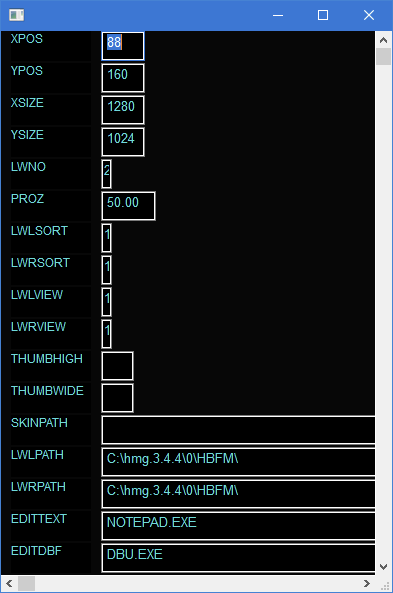
use a DBF as Parameter
press F1 to open EditForm
Re: WINDOW WITH scrollbars
Posted: Mon Jan 26, 2026 4:19 pm
by tomtagaris
ok thanks
Re: WINDOW WITH scrollbars
Posted: Tue Jan 27, 2026 9:09 am
by serge_girard
It works indeed.
Jimmy, Why is scrolling with the wheel almost impossible? (In EDIT screen).
Serge
Re: WINDOW WITH scrollbars
Posted: Tue Jan 27, 2026 10:50 am
by AUGE_OHR
hi,
serge_girard wrote: ↑Tue Jan 27, 2026 9:09 am
Why is scrolling with the wheel almost impossible? (In EDIT screen).
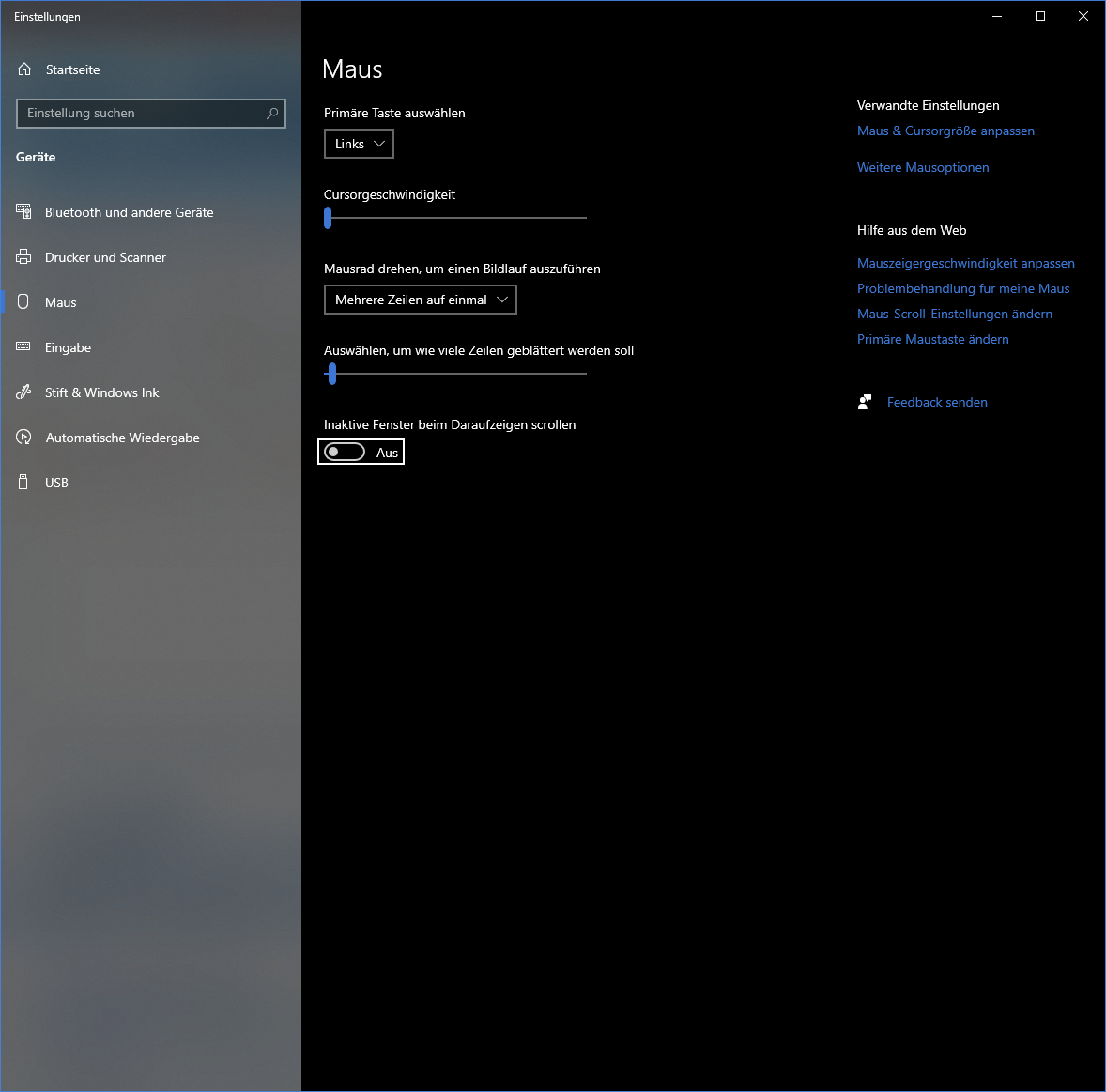
it work, you must 1st, click into Window !
but you must disable "scroll when point to Window"
Re: WINDOW WITH scrollbars
Posted: Tue Jan 27, 2026 11:42 am
by serge_girard
Reactions are very weird.... Cannot get it as I wish!
Sometimes it scrolls back and never gets over some point...
Re: WINDOW WITH scrollbars
Posted: Tue Jan 27, 2026 1:24 pm
by AUGE_OHR
hi,
serge_girard wrote: ↑Tue Jan 27, 2026 11:42 am
Reactions are very weird....
that i can´t help.
Have you tried changing the mouse sensitivity?
Re: WINDOW WITH scrollbars
Posted: Tue Jan 27, 2026 2:28 pm
by serge_girard
Yes I did. I already had some sort of window with scrollbars and the problems arise also.
I will try on another PC...
Thanks, Serge