Page 1 of 2
EditBox - Resizable
Posted: Mon Feb 16, 2015 12:59 pm
by Pablo César
Hi HDT and others,
How about to add an option in EditBox to accept SizeProcedure and let to final users to resize this control

I have experienced adding
WS_SIZEBOX at INITEDITBOX function in c_editbox.c and you can test this attached executable file and give your opinion if you want:
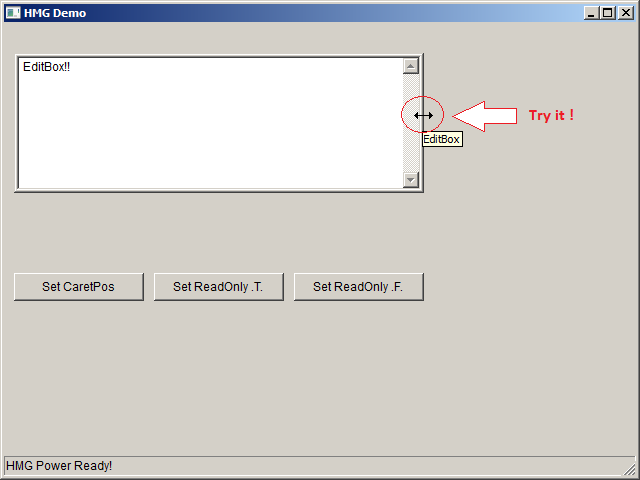
- Screen1.png (12.89 KiB) Viewed 5656 times
Sometimes users would need to size EditControl and at that time could be actioned an
UDF (User Defined Function) which could allow to resize form or execute others routines following the EditBox resizing.

All for improvings that would all enjoyed it !

Re: EditBox - Resizable
Posted: Mon Feb 16, 2015 1:10 pm
by serge_girard
This is a great Pablo !
Serge
EditBox - Resizable
Posted: Mon Feb 16, 2015 1:16 pm
by Pablo César
Good to know this could be useful.
Thank you for expressing opinions Serge !
Now shall see HDT reaction to evaluate for impletation in HMG.
Re: EditBox - Resizable
Posted: Mon Feb 16, 2015 1:23 pm
by mol
Nice sample!
But, It should be possibility to limit size by programmer, I think. (Maybe it's done?)
EditBox - Resizable
Posted: Mon Feb 16, 2015 1:36 pm
by Pablo César
Thank you Marek for your interest.
mol wrote:But, It should be possibility to limit size by programmer, I think. (Maybe it's done?)
Yes I also believe this could it be possible if EditControl could allow to insert something like this:
ON SIZE <{SizeProcedure}> as new property of control (new style).
I also was looking also for this:
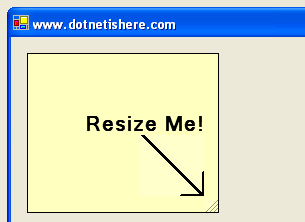
- figure1.gif (5.44 KiB) Viewed 5648 times
Its name is
RESIZE CONTROL.
But I do not know how to do it. All these demmands need for HDT be approved and better implement.
EditBox - Resizable
Posted: Mon Feb 16, 2015 1:41 pm
by Pablo César
It is also posible to limit which can be allow for sizing side.
Thru WM_NCHITTEST can know it.
https://msdn.microsoft.com/en-us/librar ... s.85).aspx
Re: EditBox - Resizable
Posted: Mon Feb 16, 2015 3:24 pm
by srvet_claudio
In this example you move and resize a Grid control:
Code: Select all
#define WS_CAPTION 0x00C00000
#define WS_SIZEBOX 0x00040000

HMG_ChangeWindowStyle ( Form_1.Grid_1.Handle, WS_CAPTION + WS_SIZEBOX, NIL, .F., .T. )
EditBox - Resizable
Posted: Mon Feb 16, 2015 3:53 pm
by Pablo César
Thanks Claudio,
So, you mean that no need to mess in HMG source code to get EditBox as Resizable with:
HMG_ChangeWindowStyle ( Form_1.Edit_1.Handle, WS_SIZEBOX, NIL, .F., .T. )
Code: Select all
/*
 * HMG - Harbour Win32 GUI library Demo
 *
 * Copyright 2010 Roberto Lopez <mail.box.hmg@gmail.com>
 * https://www.hmgforum.com//
*/

#include "hmg.ch"
#define WS_CAPTION 0x00C00000
#define WS_SIZEBOX 0x00040000

Function Main

	DEFINE WINDOW Form_1 ;
		AT 0,0 ;
		WIDTH 640 HEIGHT 480 ;
		TITLE 'HMG Demo' ;
		ICON 'DEMO.ICO' ;
		MAIN

		DEFINE STATUSBAR
			STATUSITEM 'HMG Power Ready!'
		END STATUSBAR

		@ 30,10 EDITBOX Edit_1 ;
			WIDTH 410 ;
			HEIGHT 140 ;
			VALUE 'EditBox!!' ;
			TOOLTIP 'EditBox' ;
			MAXLENGTH 255 ;
			ON CHANGE ShowRowCol() ;
			DISABLEDBACKCOLOR { 0,0,255} ;
         nohscroll;
			DISABLEDFONTCOLOR { 0,255,0 }


		DEFINE BUTTON B
			ROW	250
			COL	10
			WIDTH	130
			CAPTION 'Set CaretPos'
			ACTION ( Form_1.Edit_1.CaretPos := Val(InputBox('Set Caret Position','')) , Form_1.Edit_1.SetFocus )
		END BUTTON

		DEFINE BUTTON C
			ROW	250
			COL	150
			WIDTH	130
			CAPTION	'Set ReadOnly .T.'
			ACTION	Form_1.Edit_1.ReadOnly := .T.
		END BUTTON

		DEFINE BUTTON D
			ROW	250
			COL	290
			WIDTH	130
			CAPTION	'Set ReadOnly .F.'
			ACTION	Form_1.Edit_1.ReadOnly := .F.
		END BUTTON

		DEFINE BUTTON E
			ROW	250
			COL	430
			WIDTH	130
			CAPTION	'Set Resizable'
			ACTION HMG_ChangeWindowStyle ( Form_1.Edit_1.Handle, WS_SIZEBOX, NIL, .F., .T. )
		END BUTTON

	END WINDOW

	Form_1.Center()

	Form_1.Activate()

Return Nil

Procedure ShowRowCol
Local s , c , i , e , q

	s := Form_1.Edit_1.Value
	c := Form_1.Edit_1.CaretPos
	e := 0
	q := 0

	for i := 1 to c
		if substr ( s , i , 1 ) == chr(13)
			e++
			q := 0
		Else
			q++
		EndIf
	Next i

	Form_1.StatusBar.Item(1) := 'Row: ' + alltrim(Str(e+1)) + ' Col: ' + alltrim(Str(q))

Return
But what about with:
Pablo César wrote:Mol wrote:But, It should be possibility to limit size by programmer, I think. (Maybe it's done?)
Yes I also believe this could it be possible if EditControl could allow to insert something like this:
ON SIZE <{SizeProcedure}> as new property of control (new style).
And
Pablo César wrote:Sometimes users would need to size EditControl and at that time could be actioned an UDF (User Defined Function) which could allow to resize form or execute others routines following the EditBox resizing.
Is it posible to insert UDF in On Sizing event ?
Re: EditBox - Resizable
Posted: Mon Feb 16, 2015 4:24 pm
by mol
I'm using resizing of labels in my label manager. I forgot about this solution

Re: EditBox - Resizable
Posted: Mon Feb 16, 2015 5:46 pm
by andyglezl
Hola
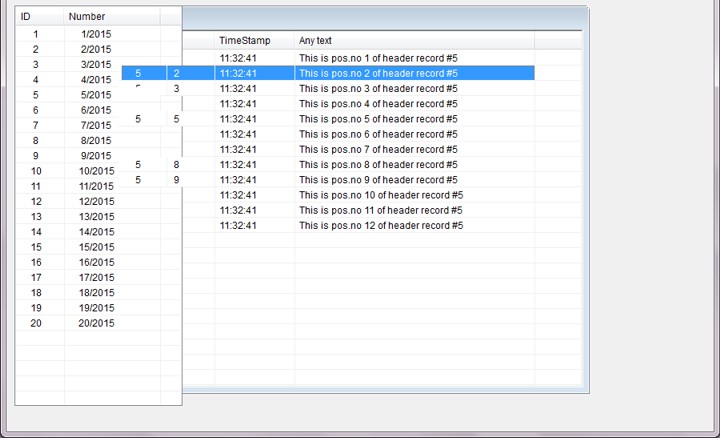
Yo creo que el problema va a estar en como manejar o controlar hasta donde se puede hacer
"Resize" del control ya que afectaría a los demás controles que estan alrededor.
------------------------------------------------------------------------------------------------------------
hello
I think the problem will be how to manage or control up to where you can do
"Resize" control as it would affect the other controls that are around.
- ResizeControl.jpg (76.76 KiB) Viewed 5609 times