Se ve interesante aplicar esta propiedad en algunos controles...
* en algunos, con doble click se maximizan
* se pueden mover de lugar
* se pueden cambiar de tamaño
--------------------------------------------------------------------------
It looks interesting to apply this property to some controls ....
* In some, double click maximizing
* You can move from place
* You can resize
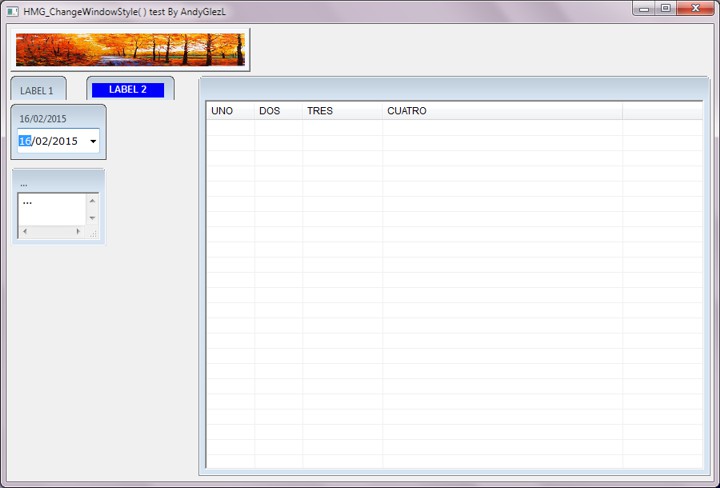
- HMG_ChangeWindowStyle.jpg (58.73 KiB) Viewed 2980 times
Code: Select all
/*
* HMG_ChangeWindowStyle( )
* (c) 2009 Roberto Lopez
*/

#include "hmg.ch"
#define WS_CAPTION 0x00C00000
#define WS_SIZEBOX 0x00040000

Function Main

	aHeaders :=	{ "UNO","DOS","TRES","CUATRO" }
	aWidths	 :=	{ 60,60,100,300 }

	DEFINE WINDOW Form_1 AT 0,0 WIDTH 900 HEIGHT 610 TITLE 'HMG_ChangeWindowStyle( ) test By AndyGlezL' MAIN

		@ 005,005 IMAGE img1 PICTURE 'cLogoEmp.jpg' WIDTH 300 HEIGHT 55 STRETCH  					;  HMG_ChangeWindowStyle( Form_1.img1.Handle, WS_SIZEBOX, NIL, .F., .T. )
		@ 065,005 LABEL L1 VALUE "LABEL 1" WIDTH 70 HEIGHT 30 SIZE 14 ACTION MsgInfo( "LABEL")  	;  HMG_ChangeWindowStyle( Form_1.L1.Handle, WS_CAPTION + WS_SIZEBOX, NIL, .F., .T. )
		@ 065,100 LABEL L2 VALUE "" WIDTH 110 HEIGHT 30 ACTION MsgInfo( "LABEL")  					;  HMG_ChangeWindowStyle( Form_1.L2.Handle, WS_CAPTION + WS_SIZEBOX, NIL, .F., .T. )
		@ 074,107 LABEL L22 VALUE "LABEL 2" WIDTH 90 HEIGHT 18 BOLD BACKCOLOR BLUE FONTCOLOR WHITE CENTERALIGN
		@ 100,005 DATEPICKER DP1 WIDTH 120 HEIGHT 70 FONT "Verdana" SIZE 9 							; HMG_ChangeWindowStyle( Form_1.DP1.Handle, WS_CAPTION + WS_SIZEBOX, NIL, .F., .T. )
		@ 065,240 GRID Grid1 WIDTH 640 HEIGHT 500 HEADERS aHeaders WIDTHS aWidths					; HMG_ChangeWindowStyle( Form_1.Grid1.Handle, WS_CAPTION + WS_SIZEBOX, NIL, .F., .T. )
        *@ 180,005 COMBOBOX combo1 WIDTH 120 FONT 'Arial' SIZE 12 ITEMS aHeaders VALUE 1				; HMG_ChangeWindowStyle( Form_1.combo1.Handle, WS_CAPTION, NIL, .F., .T. )
		@ 180,005 EDITBOX EB1 WIDTH 120 HEIGHT 98 FONT "Verdana" SIZE 9 VALUE "..." MAXLENGTH 230 	; HMG_ChangeWindowStyle( Form_1.EB1.Handle, WS_CAPTION + WS_SIZEBOX, NIL, .F., .T. )
	END WINDOW
	CENTER WINDOW Form_1
	ACTIVATE WINDOW Form_1
Return