Page 1 of 1
variable Lost after Second Call
Posted: Wed Dec 24, 2025 2:49 pm
by AUGE_OHR
hi,
i have a funny Problem : i "lost" a Variable after Second Call ?
it work twice, but when call 3rd, Time i got "Error BASE/1003 Variable does not exist: DFROM" ???
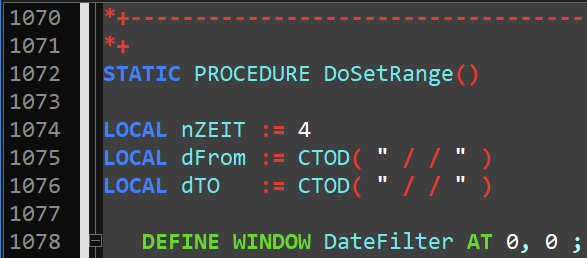
i init it here
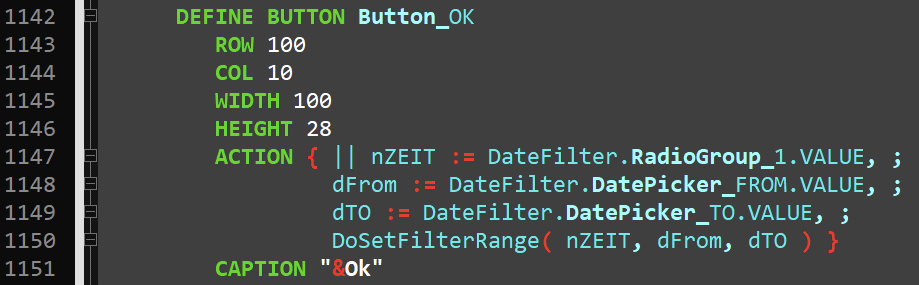
here i pass Parameter
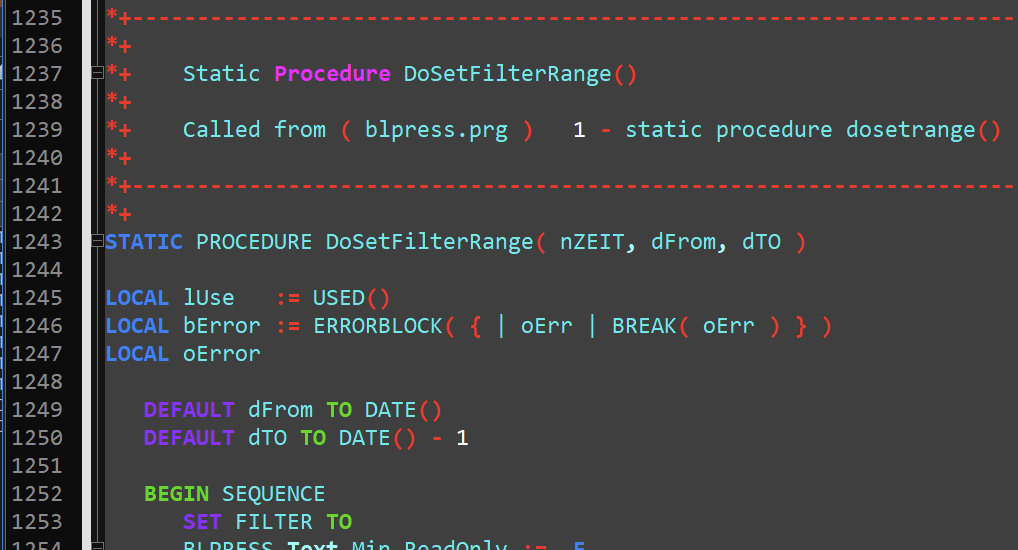
and here i set Parameter as DEFAULT
here is the full Source CODE, look at BLPRESS.PRG
goto Main/Menu an select "Date Range" use one of the Radio Button (1-3, not 4)
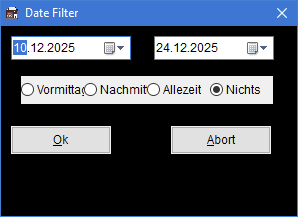
try it again and when thy 3rd. Time you will get the Error ...
Re: variable Lost after Second Call
Posted: Wed Dec 24, 2025 3:43 pm
by serge_girard
Jimmy, I will try this after Xmas!
S
Re: variable Lost after Second Call
Posted: Thu Dec 25, 2025 6:01 am
by AUGE_OHR
hi,
found a Way to work : use Function instead of Variable !
Code: Select all
*+--------------------------------------------------------------------
*+
*+ Source Module => x:\hmg.3.4.4\0\PULS\STACK.PRG
*+
*+    Copyright(C) 1983-2026 by Auge & Ohr
*+
*+    Functions: Function SP_INIT()
*+               Function SP_DFROM()
*+               Function SP_DTO()
*+
*+    Reformatted by Click! 2.05.42 on Dec-25-2025 at  6:51 am
*+
*+--------------------------------------------------------------------

#include "hmg.ch"

#xtranslate F_DFROM       => Stack\[SP, 1]
#xtranslate F_DTO         => Stack\[SP, 2]

STATIC Stack := {}
STATIC SP    := 0

*+--------------------------------------------------------------------
*+
*+    Function SP_INIT()
*+
*+    Called from ( blpress.prg )   1 - procedure main()
*+
*+--------------------------------------------------------------------
*+
FUNCTION SP_INIT()                                                    // init STACK

   AADD( Stack, ARRAY( 2 ) )
   SP ++
   F_DFROM := CTOD( " / / " )
   F_DTO := CTOD( " / / " )
RETURN NIL

*+--------------------------------------------------------------------
*+
*+    Function SP_DFROM()
*+
*+    Called from ( blpress.prg )   1 - static procedure dosetrange()
*+                                   4 - static procedure dosetfilterrange()
*+
*+--------------------------------------------------------------------
*+
FUNCTION SP_DFROM( Value )

   IF PCOUNT() > 0
      F_DFROM := Value
   ENDIF
RETURN F_DFROM

*+--------------------------------------------------------------------
*+
*+    Function SP_DTO()
*+
*+    Called from ( blpress.prg )   1 - static procedure dosetrange()
*+                                   4 - static procedure dosetfilterrange()
*+
*+--------------------------------------------------------------------
*+
FUNCTION SP_DTO( Value )

   IF PCOUNT() > 0
      F_DTO := Value
   ENDIF
RETURN F_DTO

*+ EOF: STACK.PRG
Code: Select all
PROCEDURE MAIN()
...
// on TOP
   SP_INIT()
...
Code: Select all
STATIC PROCEDURE DoSetRange()
...
         ACTION { || nZEIT := DateFilter.RadioGroup_1.VALUE, ;
                  SP_DFROM( DateFilter.DatePicker_FROM.VALUE ), ;
                  SP_DTO( DateFilter.DatePicker_TO.VALUE ), ;
                  DoSetFilterRange( nZEIT ) }
Code: Select all
STATIC PROCEDURE DoSetFilterRange( nZEIT )

LOCAL lUse   := USED()
LOCAL bError := ERRORBLOCK( { | oErr | BREAK( oErr ) } )
LOCAL oError

   BEGIN SEQUENCE
      SET FILTER TO
      BLPRESS.Text_Min.ReadOnly := .F.
      BLPRESS.Text_Max.ReadOnly := .F.

      IF SP_DTO() >= SP_DFROM()

         DO CASE
            CASE nZEIT = 3
               SET FILTER TO BLPRESS->PDATE >= SP_DFROM() .AND. ;
                             BLPRESS->PDATE <= SP_DTO()

            CASE nZEIT = 2
now it work as i like

Re: variable Lost after Second Call
Posted: Mon Dec 29, 2025 3:59 pm
by franco
Jimmy, your first program may have worked with PRIVATE variables for dates instead of local.
They stay active until you close the function/procedure that you create them in. Not sure about static procedure, have never used them.
Re: variable Lost after Second Call
Posted: Mon Dec 29, 2025 7:49 pm
by AUGE_OHR
hi,
franco wrote: ↑Mon Dec 29, 2025 3:59 pm
Jimmy, your first program may have worked with PRIVATE variables for dates instead of local.
THX for Answer.
i´m not sure if i have used PRIVATE for Test, i use PRIVATE only very rare.
Now using Function to store Value it work without Problem.
But i still don´t understand why it have crash before
i do not understand why it work Twice, but than Fail at 3rd Call ???
Re: variable Lost after Second Call
Posted: Thu Jan 01, 2026 5:39 pm
by franco
Jimmy, private variables stay active until you release calling program. Local are not available to any procedures called from
procedure making them.
Build this below. you will see how it works. in procedure checkvar variable "B" is known but "A" will crash as it was local only
to first Procedure or Function.
Code: Select all
#include "hmg.ch"

FUNCTION Main
local a:= 'ax'
private b := 'bx'
checkvar()

RETURN

PROCEDURE checkvar()
msgbox(b)
msgbox(a)
RETURN
Re: variable Lost after Second Call
Posted: Fri Jan 02, 2026 3:26 pm
by AUGE_OHR
hi,
franco wrote: ↑Thu Jan 01, 2026 5:39 pm
Build this below. you will see how it works. in procedure checkvar variable "B" is known but "A" will crash as it was local only to first Procedure or Function.
THX, i know this
as you can see i pass LOCAL as Parameter and i also declare DEFAULT TO so i don´t understand why a Error of "unkown DFROM" can exist ?!
p.s. i do not like using PRIVATE, because it becomes confusing with large programs containing many lines of CODE.
Using FUNCTION instead of PRIVATE/PUBLIC, together with a documenter like CLICK, you get an overview of WHERE the variables are called up.
Re: variable Lost after Second Call
Posted: Sat Jan 03, 2026 1:31 am
by franco
Every time you go to a different function or procedure you will have to pass the parameter.
I use this all the time in very large programs, but never from a main type function. these functions get closed fairly quickly.
If I need variables for throughout the program I make them public. I also have a large control file that if I need to store variables
I have a field for them in there and can change them when needed.
I guess it depends on what you get used to doing..... We all have own ways.